

 LinkedIn
Somebody pasted a roughly 1,000-character buyer persona into Google, and groas appeared in the results. Our Search Console logged 42 impressions at average position 6.1, with zero clicks. A second persona brief logged 28 impressions at 4.1. An instruction to evaluate an agency logged 43 at 7.6, also with no clicks.
I used to tell clients Search Console was a keyword report. I was wrong. Part of it now reads like a prompt log: full buyer briefs, evaluation commands and stray replies such as yes and give me your source. These rows cannot tell us whether an AI answer cited groas, or what the person did next. They can tell us the wording Google received and whether our pages appeared for it. That is a better first look at which prompts touch your brand than paying a tracker to choose the prompts for you.
One property, three revealing rows
The dataset is reedandridge.com’s own Search Console Performance report, Queries view, exported for a recent window. It is one property, not a benchmark for everyone else. We are a small site with specialist vocabulary, which makes unusual queries easier to spot among the familiar ones.
I sorted the export by query length, then read the long rows for language that sounded more like an instruction to an assistant than a conventional search. Full sentences, multi-clause constraints, persona briefs and verbs such as evaluate went into a prompt-shaped bucket. Short, conventional searches stayed in a separate bucket. That is a reading rule, not a Google classification: a long query can still be an ordinary search, and a short fragment can be part of a conversation.
Here are the rows that made me stop scrolling. The figures come from our own Search Console export; impressions and position describe appearances in Google Search, not confirmed AI mentions.
| Query shape | What appeared in the query | Impressions | Average position | Clicks |
|---|---|---|---|---|
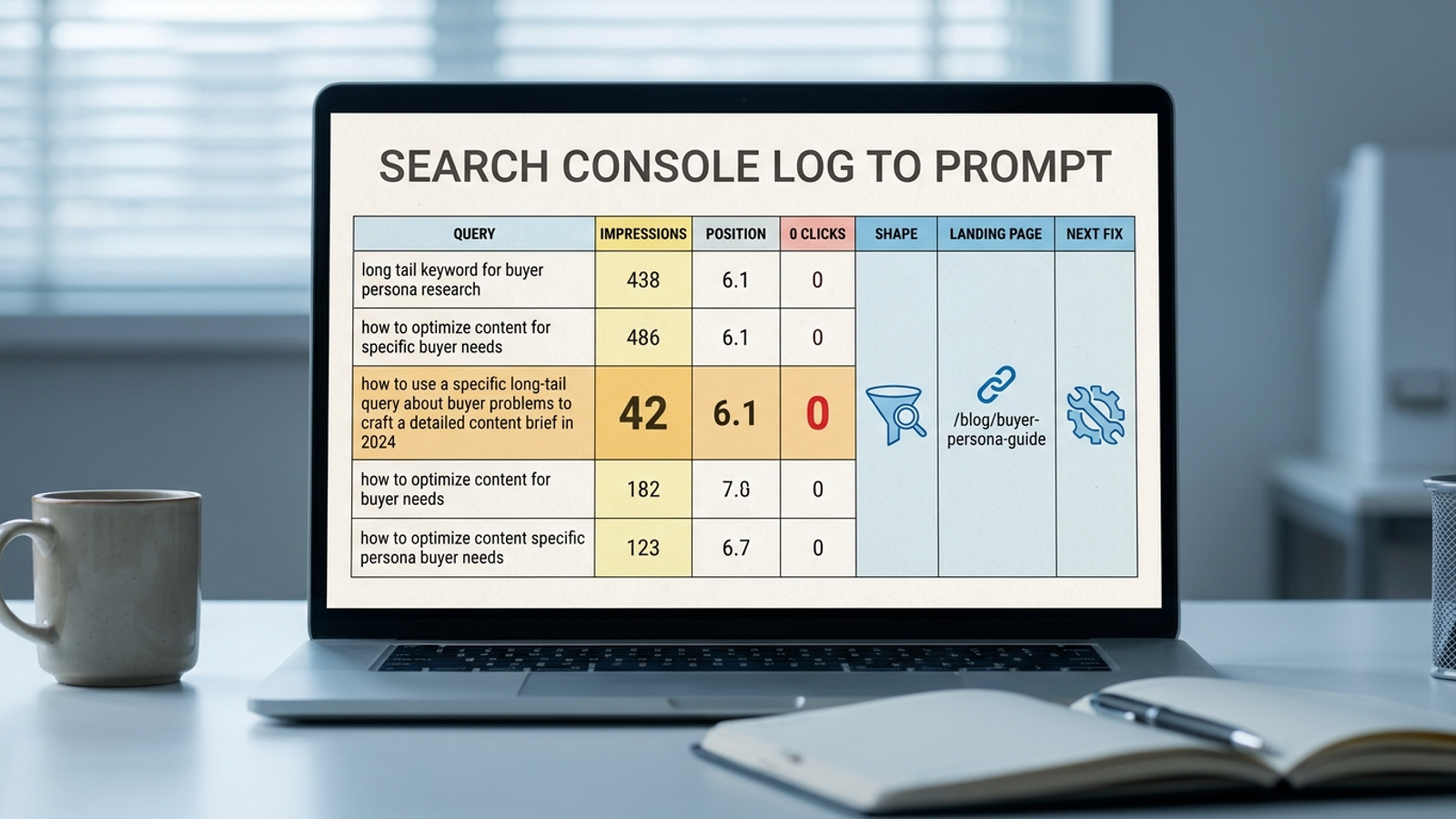
| Persona brief | Roughly 1,000-character buyer background | 42 | 6.1 | 0 |
| Persona brief | A second buyer background | 28 | 4.1 | 0 |
| Evaluation order | evaluate the marketing agency company directive consulting on aeo agency | 43 | 7.6 | 0 |
Those three rows produced over 100 impressions and no clicks between them. The surprise is not that a long query can rank. It is that a pasted brief and a direct evaluation order appeared often enough to become visible in this small export. If I had started with a list of keywords I thought buyers might use, I would not have written either persona brief that way.
The limits start here. An impression means Google showed a result; a position is an average; a zero means no click was recorded for that query in this report. None proves the person read an AI answer, saw a citation or rejected groas. But the query text is real. For a first pass at what buyers are asking Google, that is enough to justify opening the landing page.
Four shapes hiding in the query report
The longest rows were easy to notice. The shorter ones needed context. A query like yes looks like junk beside a persona brief, but AI Mode follow-ups can appear as new queries with their own impressions and positions. That makes fragments worth inspecting, not automatically worth calling AI Mode traffic. Search Console does not attach the preceding conversation to the row.
| Shape | What it looked like in our export | What it might help you investigate |
|---|---|---|
| Persona brief | A long background paste | Whether a page speaks clearly to that kind of buyer |
| Evaluation order | evaluate the marketing agency company directive consulting on aeo agency | Whether a page gives a usable verdict on a named vendor |
| Comparison prompt | Agency-type versus agency-type wording | Whether a page makes the distinction the query asks for |
| Fragment | yes, where is their website, give me your source | Whether the row may belong to a longer exchange |
I would not merge those shapes into one grand “AI traffic” total. A comparison can be a conventional search. A fragment can be ambiguous. The useful move is smaller: keep the wording, group similar requests, and inspect the pages Google associated with them. The query is the lead; the page is where the work starts.

The pages behind the impressions
The persona briefs pointed to deep explainer pages, not the homepage. The evaluation order pointed to a comparison post. Fragments appeared against the same small group of pages. In this export, thin service pages did not show up for these rows.
That distribution gives me a concrete editing question. Can someone lift a sentence from the page and understand whom it serves, what it does and where it differs from the alternative? The deep pages had named subjects and direct verdicts near the top. The thinner pages mostly said we do paid and organic search. The export cannot prove why Google chose one page over another, but it tells me which pages to inspect first.
It also stops a common mistake. Zero clicks do not, by themselves, diagnose a content gap. Someone may have got enough from the results page, chosen not to visit, or had a different aim altogether. Still, a recurring, specific brief with impressions and no clicks is a reasonable reason to check whether the landing page actually answers it. That check costs less than commissioning a new article around a prompt nobody has entered.
Paid visibility tools often focus on which queries trigger AI mentions. That is a different question from the one this export answers. Search Console gives me the wording and a page to examine. It does not give me a reliable citation log. I would use the free evidence before paying to observe the part it cannot see.
Find your own rows in one export
At the end of this pass, you should have a short sheet of prompt-shaped queries, their Search Console metrics and the pages associated with them. You need access to the property and a spreadsheet. Set aside roughly 20 minutes for the first pass; reading the pages can take longer.
-
Export the baseline. In Search Console, open
Performance > Search results > Queries, setDate > Last 28 days, then chooseExport > Download CSV. Expect columns for query, clicks, impressions, CTR and position. The mistake here is treating that export as a complete record of demand. It is the visible part of one date window. Keep the unfiltered file so you can compare what the next steps remove. -
Pull out long queries. In your sheet, filter for roughly more than ten words. If you prefer to narrow the report before exporting, use
Performance > Add filter > Query > Custom (regex)and enter the first pattern below. Expect a smaller reading list, not a finished list of AI prompts. The mistake is assuming word count identifies intent: a long how-to search can still be an ordinary keyword query. -
Read for intent. Apply the question-anchor and evaluation patterns below as separate passes, then read the results. Mark persona briefs, direct evaluations and comparisons. Put fragments such as
yesandwhere is their websitein a separate group rather than attaching them to a conversation you cannot see. Expect a few distinct shapes, with overlaps. The mistake is letting a regex decide that every matched row came from an AI-assisted buyer.
(\S+\s+){10,}\S+
(?i)^(what|which|who|how|why|should|can|is|are|does|do)\b.{30,}
(?i)(evaluate|compare|versus|\bvs\b|best|alternative|review)
- Join each query to its page. Add columns named
Shape,Landing pageandNext fix. In Search Console, select a query, then open thePagestab to see the associated page or pages; copy the relevant URL into your sheet. ForNext fix, write one action, such assharpen verdict,add comparison tableormake the definition quotable. Expect a working edit queue, not an attribution model. The mistake is assuming every query belongs to one page when the Pages tab shows more than one.
The patterns are starting points. A length filter and question anchors help surface candidates; neither certifies where a query originated. Read the rows. That is the part the regex cannot do.
A useful result might resemble the cluster in our export: long briefs and verdict requests pointing back to a small set of pages, often with impressions but little click activity. Do not force your sheet to match ours. Verify that the process worked by repeating the same export and date window each week for a month. Check whether similar query shapes and pages keep appearing. The first thing to change is the clearest answer on a page already associated with a real brief, not the number of rows in your tracker.
What the export cannot tell you
Search Console sees activity in Google Search, not every question a buyer asks elsewhere. It also does not expose every query in its report. Reporting gaps and anonymous queries mean this is a partial view, especially for the long tail. That makes the visible rows valuable examples, not a census you can multiply into a market-size estimate.
Prompt length illustrates the boundary without solving it: Similarweb reports an average ChatGPT prompt of about 60 words against an average Google search of 3.4. Those averages describe different environments. They do not tell me how many unseen prompts mentioned groas. Anything asked and answered outside the Google activity reported for our property is outside this export.
The workaround is a controlled direct test, not a claim that Search Console sees everything. Write 25 to 40 buyer prompts in wording you would actually want to check. Run the same wording on ChatGPT, Gemini, Perplexity, AI Overviews and AI Mode; log whether the brand is named or cited, its position and the tone of the answer. Repeat weekly for a month, as outlined in this brand-visibility audit approach. Keep those observations separate from Search Console metrics. One is a repeatable test of selected prompts; the other is a record of queries that appeared in your report.
That separation matters when you edit. A query with impressions tells you there is a page to inspect. A direct test can show how a particular answer treats the brand. Neither tells you that changing a paragraph will create a click or lower CPA. Measure the change after you make it.
The decision these rows support
Start with the top 20 prompt-shaped rows by impressions, if your property has that many. Prioritise the ones appearing around positions 4 to 8 with zero or one click. Open the associated pages and ask whether the first 200 words answer the request in plain language. For a persona brief, can a reader see who fits and who should skip the service? For an evaluation order, is there a direct verdict? For a comparison, does the page name the better fit for the case instead of offering a foggy list of options?
I would edit an existing page that already appears for several real briefs before writing separate posts for imagined ones. That choice follows the evidence: the export names the queries and points to the pages. It does not promise that a sharper answer will win a citation or a visit. Re-export after 28 days and look for changes in the same kinds of rows before claiming a result.
This approach will not give every site a substantial list. If your property had under 500 impressions in the last 28 days, you may have too few visible prompt-shaped rows to mine. Go to direct prompt testing rather than pretending an empty filter settles the question.
For everyone else, the order is free log first, controlled prompt test second, continuous tracking when repetition justifies it. I still check ours by hand once a month. groas tracks prompts, AI answers, citations and share of voice weekly, because that repeated observation is work a machine can do without billing an hourly rate for it.
If you find even five rows like ours, use them as the brief for your next content pass. Rewrite the two or three pages they point to in sentences a person can understand and an answer can quote. Then run the export again. Keep what the numbers show separate from what you hope happens next. The prompt was already there; you did not need to buy a guess.